
The best table saw dial indicator makes blade alignment fast, clear, and far more accurate.
A table saw can look square and still leave burn marks, tight cuts, or uneven edges. I know how frustrating that feels, especially after spending time on a careful setup. A good dial indicator turns that hidden error into a clear reading you can act on. It helps check blade-to-miter-slot alignment, fence position, and table setup with less guesswork. In this guide, I compare popular table saw gauges for home shops, serious woodworking spaces, and general machine calibration. I focus on accuracy, fit, ease of use, build quality, and real value.

Neoteck 0-1″ Digital Dial Indicator…
【Professional Table Saw Gauge】Neoteck table saw gauge is designed according to the standard miter grooves(3/8 inch x 3/4 inch). It can check table saw miter slot to blade squareness, blade…

BOBOVAV Table Saw Alignment Gauge…
High Precision Digital Measurement: BOBOVAV digital table saw alignment gauge features a digital dial indicator with 0.0005″ (0.01mm) resolution; supports inch/mm switch and zero-setting for intuitive clear readings that save…

HDLNKAK Table Saw Dial Indicator…
【Professipnal Table Saw Gauge】Table Saw Gauge is designed according to the miter slot (3/8 “x 3/4”) and can be used to check table saw blade and saw grid alignment, tool…
Neoteck Digital Table Saw Dial Indicator

The Neoteck 0-1 inch digital gauge gives you a simple way to check table saw alignment. Its digital display is easy to read while you move the bar through the miter slot. That matters when your eyes move between the blade, the gauge, and the table. The broad measuring range also makes it useful for more than one small adjustment.
I like this style of gauge for routine setup work because it removes much of the guesswork. You can compare the front and rear blade readings and then make a small correction. The tool can also help inspect a fence, miter slot, or other workshop surface. As with any dial indicator, check that the contact tip touches the work at a steady angle before trusting the reading.
Pros:
- Clear digital readout for quick checks
- 0-1 inch measuring range suits common table saw tasks
- Useful for blade and fence alignment
- Simple design helps new users learn faster
- Compact size stores easily in a tool drawer
- Can support checks on other shop machines
Cons:
- Digital batteries need periodic replacement
- Fit depends on the size of your miter slot
- Basic construction may not suit heavy production use
My Recommendation
The Neoteck digital model is a strong choice for hobby woodworkers who want a readable gauge without a complex setup. It is especially useful for a homeowner who checks a saw a few times each month. The digital screen may feel more natural than a small analog face. If you want the best table saw dial indicator for simple blade alignment and broad general use, this model offers a practical starting point. Check the slot size and included hardware before ordering.
BOBOVAV Precision Table Saw Alignment Gauge

The BOBOVAV alignment gauge combines a 0.0005-inch dial indicator with an 18-centimeter rod and an aluminum guide bar. That level of resolution gives experienced users more room to spot small changes. The screw adjustment can help reduce loose movement during setup. A stable gauge matters because even a small twist can make a good saw look out of line.
This tool is aimed at users who care about repeatable calibration. The guide is made to fit a 3/4-inch or larger slot, but I would still measure your saw before purchase. The aluminum bar should slide smoothly rather than scrape or bind. Use slow, even movement, and take more than one reading when the difference is very small.
Pros:
- Fine 0.0005-inch indicator resolution
- Aluminum bar supports a stable setup
- Screw adjustment helps control play
- 18-centimeter rod covers common alignment checks
- Useful for blade calibration and repeat setup
- Good fit for experienced woodworkers
Cons:
- May be more tool than a casual user needs
- Requires a compatible 3/4-inch or larger slot
- Fine readings demand careful technique
My Recommendation
I recommend the BOBOVAV to serious hobbyists and cabinetmakers who want a more refined alignment tool. Its fine resolution can help when a basic gauge does not show enough detail. It is a good option for users who already understand zeroing, contact pressure, and controlled movement. For that audience, this may be the best table saw dial indicator in the group for precision-focused work. It also has value for regular machine maintenance.
HDLNKAK Table Saw Dial Indicator Gauge

The HDLNKAK gauge is built around a 0-1 inch dial indicator with 0.001-inch graduations. It is made for table saw calibration, but the listing also presents it for band saws, drill presses, and other workshop machines. That wider use can make it a useful part of a small maintenance kit. A familiar analog face also works without a battery.
I see this as a sensible middle-ground tool. It gives you enough detail for normal woodworking alignment without forcing you to manage a digital display. The main task is to keep the gauge square and apply the same pressure at each measuring point. If you do that, the reading can guide small adjustments to the saw trunnion or blade position.
Pros:
- Battery-free analog operation
- 0-1 inch range handles common shop checks
- 0.001-inch graduations are useful for woodworking setup
- Works with several types of machinery
- Easy to store and carry around a workshop
- Suitable for routine blade alignment
Cons:
- Analog readings may take practice
- Does not offer the extra detail of a 0.0005-inch gauge
- Compatibility depends on the guide and slot dimensions
My Recommendation
The HDLNKAK analog gauge suits woodworkers who prefer a simple tool with no electronic parts. It makes sense for a home shop that tunes a table saw, drill press, and band saw with one gauge. I would choose it for dependable routine checks rather than ultra-fine machine inspection. It can be the best table saw dial indicator for buyers who value simplicity, broad use, and easy storage. Confirm the included guide dimensions before using it on your saw.
Neoteck 0.001-Inch Table Saw Gauge

This Neoteck model uses a 0-1 inch analog indicator with 0.001-inch graduations. That specification fits the needs of most table saw alignment jobs. The dial lets you watch the needle as the gauge travels from the front of the blade to the rear. A simple design can be an advantage when you want to focus on the saw rather than menus or settings.
I would use this gauge for checking blade parallelism, miter slot alignment, and basic fence setup. Before taking a reading, I would lock the guide in the slot and make sure the blade is clean and secure. The gauge should touch the same part of the blade at both points. This small habit can prevent a false result caused by tooth shape or uneven contact.
Pros:
- Useful 0.001-inch graduation scale
- No battery or screen to maintain
- Good range for table saw alignment work
- Simple analog face is easy to reset and observe
- Helpful for checking parallel movement
- Compact form fits most small workshops
Cons:
- Analog needle takes more care to read precisely
- May not provide enough resolution for advanced machinists
- Slot fit should be verified before use
My Recommendation
This Neoteck gauge is best for beginners and intermediate woodworkers who want to learn sound alignment habits. It provides the key information without adding unnecessary complexity. I especially like it for a first calibration tool because the needle shows movement in a direct, visual way. If you want the best table saw dial indicator for learning and regular home-shop maintenance, this is a practical candidate. Its value depends on getting a smooth, secure fit in your saw’s slot.
ALLmeter Digital Table Saw Gauge
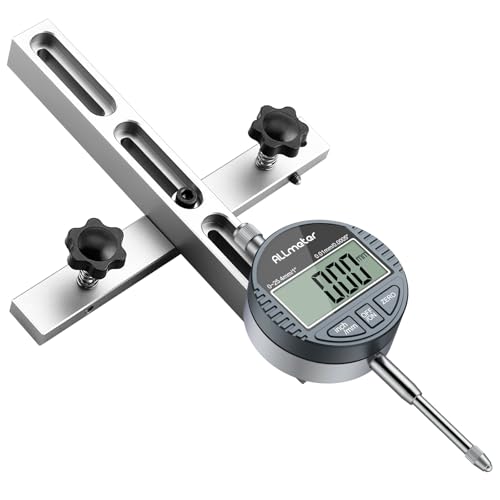
The ALLmeter digital table saw gauge offers a 0-1 inch range and a digital reading format. Digital numbers can feel easier to compare than a moving pointer, especially for users with tired eyes or limited shop lighting. The gauge is intended to support alignment work on a table saw. It may also help with other measurement tasks when the mounting setup allows it.
For best results, I would zero the display at the first measuring point and then move the gauge at a steady pace. Do not push the tool quickly or press harder at one end of the blade. A digital readout does not remove the need for good technique. It simply makes the final reading easier to see and record.
Pros:
- Large-style digital reading is easy to compare
- 0-1 inch range fits common table saw setup tasks
- Useful for users who dislike small analog scales
- Quick zeroing supports repeated checks
- Can help record small alignment differences
- Suitable for home and hobby workshops
Cons:
- Requires a battery to operate
- Electronic parts need protection from dust and impact
- Digital resolution should not be confused with total accuracy
My Recommendation
The ALLmeter digital gauge is a good match for makers who want fast, readable measurements. It is also helpful for anyone who finds a traditional needle hard to interpret. I would select it for occasional calibration, setup notes, and general woodworking maintenance. It may be the best table saw dial indicator for clear viewing and straightforward digital use. Keep spare batteries nearby and store the tool away from heavy sawdust.
GOINGMAKE Table Saw Alignment Gauge

The GOINGMAKE gauge is designed for table saw and band saw alignment. Its listed accuracy is 0.01 millimeter, which gives the metric equivalent of a fine woodworking setup tool. The guide is made to fit 3/4-inch T-slots and U-slots. That makes slot measurement an important step before you place an order.
I like the wider machine focus of this tool for a mixed workshop. A single gauge can help check a table saw today and a band saw tomorrow. Use the guide with light, even pressure so it does not rock inside the slot. When a cut still wanders after alignment, inspect the blade, fence, stock, and feed pressure rather than blaming the indicator alone.
Pros:
- 0.01-millimeter accuracy specification
- Designed for both table saws and band saws
- Fits common 3/4-inch T-slot and U-slot systems
- Useful for a mixed woodworking shop
- Supports repeat checks during machine setup
- Metric measurement suits users who prefer millimeters
Cons:
- Metric readings may feel less familiar to some US users
- Slot fit can vary between saw brands
- Requires careful handling to avoid guide rocking
My Recommendation
The GOINGMAKE is best for woodworkers who use more than one machine and want a flexible calibration tool. It is a sensible choice for a shop with a table saw and band saw. I would also consider it for users who think in metric measurements. As the best table saw dial indicator for multi-machine use, it offers useful range and a focused design. Measure your slot and confirm the reading system before buying.
HDLNKAK Digital Alignment Gauge

This HDLNKAK digital gauge targets workshop alignment and calibration. It is suitable for table saws, band saws, drill presses, and similar machines when the guide fits. The digital format gives a direct value instead of asking you to judge the position of a needle. That can make repeated readings less tiring.
I see this model as a general-purpose shop gauge. It can help you find whether a blade, table, or other moving part shifts as you measure it. Digital tools still need a clean contact point and a stable mount. I would take three readings and look for a pattern before changing the saw, since one reading can come from dust or a small bump.
Pros:
- Digital display supports quick reading
- Useful across table saws and other shop machines
- Good choice for routine calibration work
- Reduces the need to estimate needle position
- Portable design suits shared work areas
- Can help new users build confidence
Cons:
- Battery life depends on use and storage habits
- General-purpose design may lack specialized adjustments
- Users must confirm guide compatibility
My Recommendation
I recommend this HDLNKAK model for a small shop that needs one digital indicator for several machines. It is a friendly option for users moving from visual checks to measured setup. The clear display can save time when you repeat a test after making an adjustment. It may be the best table saw dial indicator for broad workshop use at a sensible level of complexity. Store it in a case or clean drawer to limit dust exposure.
TRUTOPWAY Table Saw Alignment Gauge

The TRUTOPWAY alignment gauge uses a 0.001-inch precision dial indicator. It is made to fit 3/4-inch miter slots, a common size on many full-size table saws. The tool focuses on blade alignment and calibration rather than acting as a broad measuring kit. That focused purpose can make it easier to keep with your table saw accessories.
A good setup begins with a clean slot and a blade free from pitch or resin. I would set the indicator against a smooth blade surface, mark the starting position, and move the gauge without lifting it. The rear reading should be compared with the front reading under the same conditions. This method gives a clear picture of parallel alignment and helps avoid random adjustments.
Pros:
- 0.001-inch precision suits common woodworking work
- Designed around a standard 3/4-inch miter slot
- Focused tool for blade alignment
- Analog face needs no battery
- Useful for repeat table saw calibration
- Easy to keep with other saw accessories
Cons:
- May not fit nonstandard or narrow slots
- Analog readings require good lighting and care
- Less useful if you need a digital display
My Recommendation
The TRUTOPWAY is best for a table saw owner who wants a dedicated alignment tool. It suits users who already have a basic understanding of miter-slot fit and blade setup. I would choose it when a standard 3/4-inch slot is confirmed and battery-free operation matters. For many woodworkers, this is a strong candidate for the best table saw dial indicator because it keeps the job simple and focused. Its value is highest when used as part of a regular tune-up routine.
ALLmeter 0.0005-Inch Alignment Tool
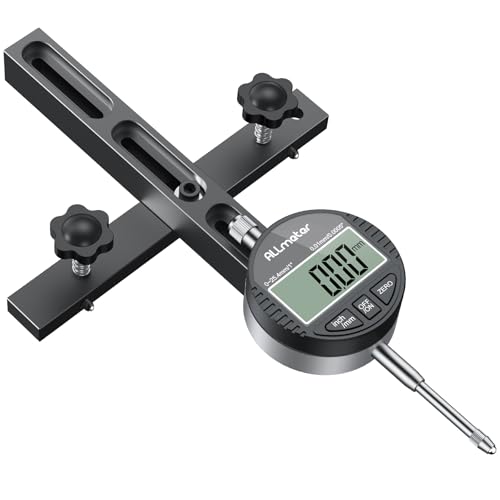
The ALLmeter alignment tool is listed with 0.0005-inch precision. That fine specification is attractive to woodworkers who want to see small differences during blade setup. It is intended as a digital table saw alignment tool. A fine indicator can reveal movement that a coarse gauge may hide, but the whole setup must remain stable.
I would pair this tool with a careful measuring routine. Clean the blade, lock the guide, set the display to zero, and use the same contact point for each reading. Do not expect a fine scale to correct a loose miter bar or a bent blade. When the tool and method are sound, this type of indicator can make a table saw tune-up feel more like a controlled test than a guessing game.
Pros:
- Fine 0.0005-inch precision specification
- Digital format makes small changes easier to observe
- Useful for detailed blade alignment
- Good fit for careful tuning work
- Can help identify small setup errors
- Suitable for experienced woodworking users
Cons:
- Fine readings magnify errors in the setup method
- Digital operation requires a battery
- May be unnecessary for rough or occasional work
My Recommendation
I would point experienced woodworkers toward the ALLmeter when fine readings matter. It is best for users who take time to control contact, travel, and zero position. It can help tune a saw that must produce clean cabinet parts or repeated joints. If precision is your main goal, this model deserves consideration as the best table saw dial indicator for detailed calibration. It offers the most benefit when the saw itself is already in good mechanical condition.
How a Table Saw Dial Indicator Works
A dial indicator measures small movement through a spring-loaded contact tip. When the tip moves, the dial or digital display shows the change. On a table saw, you normally attach the indicator to a bar that travels in the miter slot. You then compare the blade position at two points, often near the front and rear of the blade.
If the readings differ, the blade may not run parallel to the miter slot. That can lead to rubbing, burning, poor cuts, or extra kickback risk. A dial indicator does not replace the blade guard, riving knife, or safe feeding habits. It is a setup aid that helps you make a more informed adjustment.
What to Check Before Buying
Accuracy and resolution
Resolution tells you how finely the scale is marked. Accuracy tells you how close the reading is to the true value. These are not the same thing. A gauge with 0.0005-inch graduations may show tiny movement, but a loose mount can still produce a poor result.
For most home woodworking, 0.001-inch graduations provide useful detail. Fine-resolution models can help experienced users, but only when they use a stable guide and a repeatable method. I would choose a dependable fit over an impressive number on the dial.
Digital or analog display
A digital display is quick to read. It can work well in a dim shop or for users who find small analog marks difficult. It also makes it easy to note a number before and after an adjustment.
An analog indicator needs no battery. Its needle shows movement as it happens, which many machinists find natural. It may also tolerate long storage better. The best table saw dial indicator for you may come down to which display you can read without strain.
Miter-slot compatibility
Do not assume every table saw has the same slot. Many use a 3/4-inch miter slot, but some compact saws use a different width or shape. T-slots and U-slots may also need a special guide design.
Measure the slot before ordering. Check both width and depth. The guide should slide with little side play, but it should not bind. Too much looseness can make the indicator readings jump.
Guide stability
The guide is the foundation of the measurement. If it rocks, twists, or drags, the dial will report movement from the guide instead of the saw. Look for a bar with a secure fit and an adjustment method that holds the tool in place.
An aluminum bar can be light and easy to handle. A metal guide with a screw adjustment may offer better control. No material can fix a wrong slot size, so fit still comes first.
Range and travel
A 0-1 inch range is common for table saw alignment. You usually need only a small amount of travel to compare blade positions. A larger range can help with other shop tasks, but it may add size without adding value for this one job.
Make sure the indicator has enough travel for your setup. The contact tip should not reach its limit while you move from one point to another. Leave some spare travel so the gauge does not bottom out.
How I Use a Table Saw Dial Indicator
I start by unplugging the saw. I remove the blade or position it safely according to the saw maker’s instructions, then clean the table and miter slot. Pitch, dust, and chips can change the way the guide sits. A clean surface gives the tool a fair chance to produce a useful reading.
Next, I install the guide and check for side play. I place the indicator against a smooth section of the blade, not a tooth. I rotate the blade by hand only when the saw is unplugged and the setup is safe. Then I choose a reference point and mark it with a small piece of tape if needed.
I zero the gauge at the front of the blade. I move the guide to the rear without lifting the contact tip. I record the reading, return to the first point, and repeat the test. If the result changes each time, I stop and find the cause before adjusting the saw.
A difference between the front and rear readings suggests that the blade and slot are not parallel. I consult the saw manual for the correct trunnion or table adjustment. I make a small change, then test again. Patience matters here. A table saw can behave like a stubborn door hinge: a tiny shift at the mount can create a large change at the far end.
Accuracy Tips That Prevent Bad Readings
- Use a clean, smooth blade surface.
- Keep the indicator tip at a consistent angle.
- Apply light and even contact pressure.
- Move the guide at a slow, steady pace.
- Use the same blade reference point each time.
- Check the guide for side play before measuring.
- Take at least two or three readings.
- Do not measure with the saw connected to power.
- Let the saw and gauge reach normal room temperature.
- Store the tool where dust and impacts cannot damage it.
Temperature can matter in very precise work because metal expands and contracts. For normal woodworking, clean contact and good technique usually matter more. If you need certified measurement, use a calibrated instrument and follow a formal inspection method. A shop gauge helps tune a machine; it does not automatically become a laboratory standard.
Common Table Saw Alignment Problems
Blade not parallel to the miter slot
This is the main reason many woodworkers buy a table saw dial indicator. If the blade moves closer to or farther from the slot as you travel along it, the cut may pinch or drift. Adjust the saw according to its manual. Never force a trunnion or table part beyond its intended range.
Fence not parallel to the blade
A fence can be square to the table but still need a parallel check. Set the fence near the blade and compare the front and rear distance. A small amount of relief at the rear may be used on some saws, but follow the manufacturer’s guidance. A dial indicator can show the change more clearly than a tape measure.
Miter gauge or slot play
If the miter gauge moves side to side, it can make a clean cut difficult. The problem may come from the gauge, the slot, or the fit of the alignment tool itself. Check the tool before changing the saw. The best table saw dial indicator cannot give stable data when the guide wobbles.
Blade runout
A blade may have side movement even when the arbor is aligned. Resin, a bent blade, a dirty flange, or a damaged arbor can cause runout. Check the blade and mounting surfaces. If the dial reading changes as the blade rotates, test the arbor and blade separately if your equipment and safety procedure allow it.
Safety Notes for Dial Indicator Setup
Disconnect power before installing or removing any gauge near the blade. Never reach across a blade that can start. Keep the indicator, guide, cords, and hands clear of the cutting path. Use the manufacturer’s safety instructions for your specific saw.
A dial indicator helps improve setup, but it does not make an unsafe saw safe. Keep the riving knife aligned, use the guard when the cut allows it, and stand out of the kickback line. Wear eye protection. If you feel unsure about a trunnion adjustment, stop and ask a qualified technician or consult the saw manual.
Which Gauge Style Fits Your Workshop?
Choose a digital model if you want fast readings, clear numbers, and easy comparison. The Neoteck and ALLmeter digital options suit users who value a simple visual display. The HDLNKAK digital gauge is useful when one tool must serve several machines.
Choose an analog model if you want no battery, direct needle movement, and a traditional shop feel. The Neoteck 0.001-inch, HDLNKAK analog, and TRUTOPWAY gauges fit that need. For fine work, the BOBOVAV and ALLmeter 0.0005-inch models offer more detailed specifications, provided the setup stays stable.
Choose a multi-machine gauge if you own a table saw, band saw, and drill press. The GOINGMAKE and HDLNKAK models are worth a closer look. Choose a dedicated table saw tool if you want to keep your setup fast and focused. There is no single winner for every shop, but there is a best table saw dial indicator for each type of user.
My Recommendation
| Best for | Why |
|---|---|
| Most home woodworkers | Neoteck digital models offer clear readings and a useful 0-1 inch range. |
| Precision-focused users | BOBOVAV and ALLmeter fine-resolution gauges show smaller alignment changes. |
| Multi-machine workshops | GOINGMAKE and HDLNKAK models can support table saw, band saw, and drill press checks. |
After comparing the full group, I would first match the guide to the saw slot. That step matters more than display style or a high resolution number. Next, I would choose digital for easy reading or analog for battery-free simplicity. A stable, repeatable setup will always beat a fancy gauge used with a loose guide.
How to Maintain Your Dial Indicator
Brush away sawdust after each use. Do not flood the indicator with oil or solvent unless the maker approves it. Keep the contact tip clean and check that it moves smoothly. If the needle sticks or the digital display jumps, remove the tool from service until you find the cause.
Store the gauge in a dry drawer or protective case. Avoid placing heavy tools on the guide bar. Before an important project, compare the gauge with a known reference or repeat a test several times. This simple check can reveal damage before it affects a cabinet panel or a long glue-up.
Digital models need fresh batteries and careful storage. Remove the battery if the tool will sit unused for a long time and the instructions allow it. Analog models need protection from drops and hard knocks. A small indicator is precise enough to benefit from gentle handling.
FAQs Of best table saw dial indicator
What is the best table saw dial indicator for beginners?
A clear digital model, such as a Neoteck or ALLmeter option, is often easiest for beginners. It shows the reading in a direct format. A 0.001-inch model is usually enough for normal home woodworking.
How accurate should a table saw dial indicator be?
For most woodworking, 0.001-inch graduations provide useful detail. A 0.0005-inch model may help with finer work. Accuracy also depends on guide fit, clean contact, and steady movement.
Will every gauge fit my table saw?
No. Table saw miter slots vary in width, depth, and shape. Measure your slot and compare it with the product details before buying. A loose or tight guide can create false readings.
Can I use a dial indicator on other machines?
Often, yes. Many gauges can help check band saws, drill presses, fences, and machine tables. The guide and mounting method must fit the machine, and each measurement needs a safe setup.
How do I check blade alignment?
Unplug the saw, clean the blade, and mount the gauge in the miter slot. Touch the indicator to the same smooth blade point at the front and rear. Compare repeated readings, then adjust the saw using its manual.
Final Verdict: Which Should You Buy?
For most users, I would choose a Neoteck digital model for clear readings and simple setup. Precision users should consider BOBOVAV or ALLmeter fine-resolution gauges. Your slot size and measuring habits should guide the final choice.
The best table saw dial indicator makes accurate setup less stressful. Check fit, use safe methods, and compare several readings before cutting valuable stock.