
Woodworking is more than just shaping wood—it’s about turning ideas into reality with precision and skill. At the heart of many woodworking shops sits a tool that makes this possible: the router machine. Whether you’re a hobbyist, a furniture maker, or a professional carpenter, understanding how router machines work, which type fits your needs, and how to use them safely can transform your craft. This guide explores everything you need to know about router machines for woodworking, from basic concepts to advanced tips, so you can work smarter and achieve better results.
What Is A Router Machine For Woodworking?
A router machine is a power tool used to hollow out, shape, and decorate wood surfaces. It spins a cutting bit at high speed, letting you cut grooves, create edges, make joints, and carve intricate designs. Unlike hand tools, routers offer speed, precision, and repeatable results. They are versatile enough for many tasks, from simple trimming to complex joinery.
Routers come in different forms, but all share the same core function—removing wood efficiently and cleanly. Their main advantage is the ability to change bits for different cuts, making one machine suitable for a range of tasks. Over the last few decades, routers have become essential in woodworking shops due to their flexibility and accuracy.
Types Of Router Machines
Choosing the right router machine starts with understanding the main types available. Each type has unique strengths, and the right choice depends on your projects and experience level.
1. Handheld Routers
These are the most common routers, designed to be guided by hand across the wood. There are two main styles:
- Fixed-base routers: The motor is locked in place, so the depth of the cut remains constant. They are best for edge work, straight grooves, and jobs needing steady, repeatable cuts.
- Plunge routers: The motor can move up and down. This lets you start cutting in the middle of a workpiece, ideal for mortises, inlays, and stopped grooves.
2. Table-mounted Routers
These routers are installed upside-down in a table, so the bit sticks up through the surface. You move the wood over the bit, which is great for small pieces, edge profiling, and repetitive work. Table setups improve control, safety, and accuracy, especially for detailed or production tasks.
3. Cnc Routers
CNC (Computer Numerical Control) routers are advanced machines controlled by a computer. You design your cut on software, and the router follows the plan exactly. CNC routers can cut complex shapes, letters, and patterns with high precision and repeatability. They are common in commercial shops and for makers building custom projects.
4. Trim Routers
Sometimes called palm routers, these are compact and lightweight for one-handed use. They are perfect for trimming laminate, small dadoes, and light edge work. Their size makes them easy to control but limits their power compared to larger routers.
5. Specialty Routers
Other types include router planes (for hand tool enthusiasts), spindle molders (large industrial machines), and multi-base routers (machines that switch between fixed and plunge bases).
Key Parts Of A Router Machine
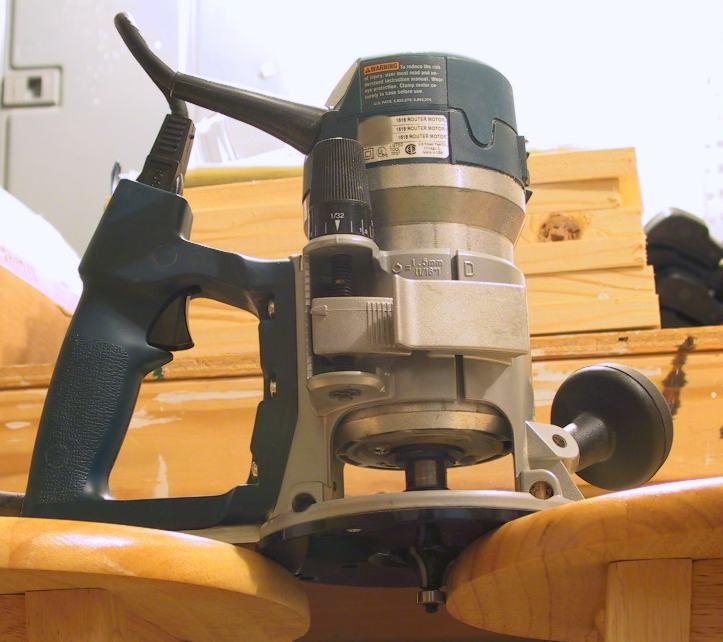
Understanding the main parts of a router helps you use and maintain it more effectively:
- Motor housing: Contains the electric motor that powers the bit.
- Collet: A sleeve that holds the router bit tightly.
- Base plate: The flat part that rests on the wood, guiding the machine.
- Depth adjustment: Lets you set how deep the bit cuts.
- Handles or knobs: For controlling and guiding the router.
- Switch: Turns the machine on and off.
Some models have extra features like LED lights, soft start motors, or dust extraction ports. These can improve safety and accuracy, especially for beginners.
How Does A Router Machine Work?
A router works by spinning a bit at high speed—often between 8,000 to 35,000 RPM (revolutions per minute). The sharp edge of the bit cuts away wood as you move the router over or along the material. Different bits produce different shapes, such as straight grooves, rounded edges, or decorative profiles.
For a simple example: running a router with a round-over bit along a table’s edge creates a smooth, curved profile. With a straight bit, you can cut slots or dadoes for shelves. The secret to clean, accurate cuts is using the right bit, proper speed, and steady movement.
Credit: en.wikipedia.org
Common Uses For Router Machines In Woodworking
Routers are one of the most versatile woodworking tools. Here’s how they are commonly used:
- Edge profiling: Creating decorative shapes on edges, like round-overs, chamfers, or ogees.
- Joinery: Cutting grooves, dados, rabbets, mortises, and tenons for strong joints.
- Inlay work: Routing precise recesses for decorative inlays.
- Template routing: Using patterns to copy shapes exactly.
- Trimming: Flush-trimming laminate or veneers.
- Lettering and sign making: Carving letters and designs.
- Surface flattening: Leveling slabs or boards with a large bit.
Many woodworkers are surprised how much a router can do with the right bit and some practice.
Choosing The Right Router Machine
Picking a router depends on your projects, skill level, and budget. Consider these key factors:
Power And Size
Routers are rated by their motor power, usually in amps (A) or horsepower (HP). Small trim routers start around 1 HP, while larger plunge routers can exceed 3 HP. More power helps with dense woods and bigger bits, but can also make the machine heavier and harder to control.
Variable Speed
Some routers have a variable speed control. This lets you adjust the RPM for different bits and woods. Large bits need slower speeds to avoid burning the wood or damaging the bit. Variable speed increases safety and helps you get the best results.
Bit Changing System
Check how easy it is to change bits. Some routers use two wrenches, while others have a spindle lock for quick changes. Easy bit changes save time and reduce frustration.
Ergonomics
Comfort matters. Look for routers with good handles, balanced weight, and easy-to-reach switches. If you work long hours, a comfortable router reduces fatigue and increases accuracy.
Dust Collection
Routing creates a lot of fine dust. Some machines have dust collection ports. Connecting these to a shop vacuum keeps your workspace cleaner and healthier.
Price
Quality routers range from $80 for basic trim routers up to $600 or more for heavy-duty or CNC models. Don’t buy only by price. Consider durability, features, and the reputation of the brand.
Here’s a comparison of popular router types and their typical uses:
| Router Type | Power (HP) | Common Uses | Price Range (USD) |
|---|---|---|---|
| Trim Router | 1.0–1.25 | Trimming, small edge work | $80–$150 |
| Fixed-Base Router | 1.5–2.25 | Edge profiles, template routing | $120–$250 |
| Plunge Router | 2.0–3.25 | Mortises, deep grooves | $180–$350 |
| CNC Router | Varies | Complex designs, production work | $400–$2500+ |

Credit: www.woodworkingnetwork.com
Router Bits: The Heart Of The Machine
A router is only as good as the bit you put in it. Router bits come in hundreds of shapes, sizes, and materials. Here are the main categories:
Common Router Bit Types
- Straight bits: Cut flat-bottomed grooves, dadoes, and rabbets.
- Round-over bits: Create smooth, rounded edges.
- Chamfer bits: Cut a beveled edge.
- Flush-trim bits: Copy the shape of a pattern or trim laminate.
- Rabbeting bits: Cut a ledge or shoulder along an edge.
- Cove bits: Make concave, decorative profiles.
- Slot cutters: Cut narrow slots for joinery or inlays.
- Specialty bits: For dovetails, panel raising, or sign making.
Bits are made from high-speed steel (HSS) or carbide. Carbide bits stay sharper longer and are worth the extra cost for most woodworkers.
Choosing The Right Bit
Pick bits based on your project and wood type. Large bits need slower speeds and more powerful routers. Cheaper bits can burn the wood or dull quickly, so invest in a few good-quality bits for the cuts you use most.
Bit Maintenance
Keep bits clean and sharp. Pitch buildup can cause burning, so clean bits with a dedicated cleaner or mineral spirits. Dull bits are dangerous—sharpen or replace them before they get too worn.
Safety Tips For Using Router Machines
Routers spin sharp bits at high speeds, so safety is critical. Here are essential safety tips:
- Wear safety glasses and hearing protection.
- Secure your workpiece with clamps to prevent movement.
- Use sharp bits—dull bits cause burning and kickback.
- Keep hands clear of the bit and path.
- Feed the wood against the rotation of the bit (usually right to left for handheld routers).
- Start and stop the router off the wood to avoid sudden movement.
- Check bit tightness before each use.
- Don’t force the cut—take shallow passes for deep grooves.
- Let the bit stop spinning before setting the router down.
- Use dust collection or a mask, as router dust is fine and harmful.
Most accidents happen from rushing or not securing wood properly. Take your time and double-check setups.
Setting Up And Using A Router Machine: Step-by-step
Even beginners can get pro results if they follow the right steps. Here’s a basic setup and use sequence:
1. Choose And Install The Bit
Select the right bit for your cut. Unplug the router, loosen the collet, insert the bit fully, then pull it out slightly (about 1/8 inch) before tightening. This prevents the bit from jamming.
2. Set The Cutting Depth
Adjust the base or plunge depth so the bit will cut just as deep as you need. For deep cuts, plan to make several shallow passes.
3. Secure The Workpiece
Clamp your wood firmly to a stable surface. If edge routing, use a sacrificial board to prevent tear-out at the ends.
4. Set The Speed
If your router has variable speed, adjust it to match the bit size and wood type. As a rule, use slower speeds for larger bits.
5. Power On And Start Routing
Hold the router with both hands. Turn it on, let it reach full speed, and gently bring it to the wood. Move steadily against the rotation of the bit.
6. Make The Cut
Keep the router moving at a steady pace. If you move too slowly, the wood may burn; too fast, and the cut will be rough. Practice on scrap wood to get the feel.
7. Turn Off And Clean Up
Lift the router off the wood before turning it off. Let the bit stop completely before setting the tool down. Clean dust from the bit and machine.
Here’s a quick overview of the setup process:
| Step | Action | Why It Matters |
|---|---|---|
| 1 | Install the bit | Ensures the right cut and safety |
| 2 | Set depth | Controls cut accuracy |
| 3 | Clamp workpiece | Prevents movement, avoids errors |
| 4 | Adjust speed | Matches bit and wood, prevents damage |
| 5 | Begin routing | Safe, controlled start |
| 6 | Complete cut | Ensures smooth, clean results |
| 7 | Power down | Prevents accidents, maintains tools |
Advanced Techniques And Tips
Once you master the basics, routers open up creative possibilities. Here are some advanced uses and tips:
Using Templates And Guides
Templates let you repeat shapes and patterns exactly. Attach a guide bushing to your router base, and follow the edge of a template for perfect copies—helpful for sign making, furniture parts, or inlays.
Edge Jointing
With the right setup, a router can straighten crooked edges. Clamp a straight board as a guide, and let the router ride along for smooth, glue-ready edges.
Pattern Routing
Secure a pattern to your workpiece and use a flush-trim bit to copy the shape. This trick is invaluable for making identical parts, like chair legs or drawer fronts.
Dovetail And Box Joints
Jigs let you cut complex joints for boxes and drawers. Dovetail joints are strong and decorative, but require precise setup. Practice on scrap first, and keep your bits sharp.
Surface Flattening
With a large straight bit and a homemade sled, you can flatten wide slabs that won’t fit in a planer. This is popular for live-edge tables.
Dust Collection Upgrades
If your router lacks built-in dust collection, consider third-party attachments or a shop-made enclosure. Better dust control means cleaner air and less cleanup.
Common Mistakes And How To Avoid Them
Beginners often make these errors:
- Forcing deep cuts in one pass: This can cause burning, rough results, or even snap the bit. Take multiple shallow passes.
- Using dull bits: A dull bit tears wood and is more likely to kick back. Replace or sharpen bits regularly.
- Routing in the wrong direction: Always feed the router against the bit’s rotation for control.
- Not securing the workpiece: Unclamped wood can shift, ruining your work or causing injury.
- Ignoring dust: Fine router dust is harmful. Always use dust collection or a mask.
A simple but overlooked insight: let the router do the work. Pressing too hard makes cuts rougher, not faster.
Maintenance And Care For Router Machines
A well-maintained router lasts longer and works better. Here’s how to keep yours in top shape:
- Clean dust regularly: Dust buildup can damage the motor or bearings. Use compressed air or a vacuum.
- Lubricate moving parts: Lightly oil depth adjustment posts and plunge rods.
- Check power cord and switches: Damaged cords are a safety hazard—replace immediately.
- Inspect the collet: Worn collets don’t grip bits well and may need replacing.
- Store bits safely: Keep bits in cases or racks to avoid damage.
- Sharpen or replace bits: Dull bits increase risk of burning and accidents.
Most routers need little maintenance beyond cleaning and checking for wear. A yearly inspection is usually enough for home users.

Credit: www.woodsmithplans.com
Router Machine Accessories
Accessories expand what your router can do. Some popular options:
- Edge guides: Help make straight, parallel cuts.
- Guide bushings: Follow templates for pattern work.
- Router lifts: Make changing bits and adjusting depth easier, especially in a router table.
- Dust collection attachments: Improve air quality and reduce cleanup.
- Jigs: For dovetails, box joints, or circles.
Choose accessories based on your most common projects. Often, a basic set of guides and a few jigs can double your router’s usefulness.
When To Upgrade To A Cnc Router
CNC routers are a big step up in price and complexity but offer unmatched precision and repeatability. Consider CNC if:
- You need to make many identical parts.
- You want to cut complex designs or 3D shapes.
- You work with signs, inlays, or detailed carving.
- Your business is growing and needs higher output.
CNC routers require learning design software and setup, but can automate tasks that would take hours by hand. Even small shops are adding CNC for custom work and production.
For a deeper look at CNC routers and woodworking, see this resource: Wikipedia: CNC Router.
Comparing Router Machines: Which Should You Buy?
Every woodworker’s needs are different. Here’s a side-by-side look at the three main types:
| Feature | Trim Router | Plunge Router | CNC Router |
|---|---|---|---|
| Best For | Light trimming, small projects | Joinery, inlays, deep cuts | Production, complex designs |
| Skill Level | Beginner–Intermediate | Intermediate–Advanced | Advanced |
| Setup Time | Minimal | Moderate | High |
| Cost | Low | Medium | High |
| Flexibility | High (for small work) | Very high | Highest (with software) |
For beginners, a mid-size fixed-base or plunge router is often the best start. Add a trim router for detail work, and consider CNC only if your work demands it.
Frequently Asked Questions
What Is The Difference Between A Router And A Cnc Router?
A router is a handheld or table-mounted power tool guided manually by the user. A CNC router is controlled by a computer, following digital designs for automatic, precise cutting. CNC routers are best for production, complex patterns, and businesses, while manual routers offer flexibility and are easier for beginners.
Can I Use A Router Machine For Metals Or Plastics?
Some routers can cut plastics or soft metals like aluminum, but this requires special bits and slower speeds. Always check the manufacturer’s guidelines and use the right safety gear. For most metal work, a dedicated metalworking tool is better.
How Long Do Router Bits Last?
Router bits last from a few hours to many years, depending on material, frequency of use, and care. Carbide bits last much longer than high-speed steel. Clean and store bits properly, and replace them when they get dull or chipped.
Is A Router Table Necessary For Woodworking?
A router table is not required, but it greatly increases safety and accuracy for small pieces, edge work, and repeated cuts. It’s a good upgrade for serious hobbyists or anyone doing a lot of routing.
What Should I Do If My Router Burns The Wood?
Burning is usually caused by a dull bit, moving too slowly, or using the wrong speed. Try replacing or sharpening the bit, taking lighter passes, and increasing feed speed. Clean bits regularly to remove pitch buildup.
A router machine is a must-have for anyone serious about woodworking. With the right model, proper bits, and a little practice, you can create strong joints, beautiful edges, and custom designs with confidence. Safety, bit selection, and setup are key to success. Whether you’re shaping your first board or making custom furniture, understanding routers unlocks new possibilities for your projects. If you invest in quality tools and keep learning new techniques, your router will be one of the most valuable tools in your shop for years to come.