
Using a Dewalt table saw can transform your woodworking projects from average to professional. Whether you are building cabinets, cutting framing lumber, or working on DIY home projects, a Dewalt table saw offers precision, power, and versatility. But to get the most out of this tool, you need to understand not just the basics, but also the finer details that ensure accuracy, safety, and great results. Many beginners overlook essential setup steps, make preventable mistakes, or miss out on features that can make their work easier and more efficient. This guide will walk you through everything you need to know to confidently use a Dewalt table saw—from setting it up for the first time, to advanced cutting techniques, to essential maintenance and troubleshooting.
Understanding Your Dewalt Table Saw
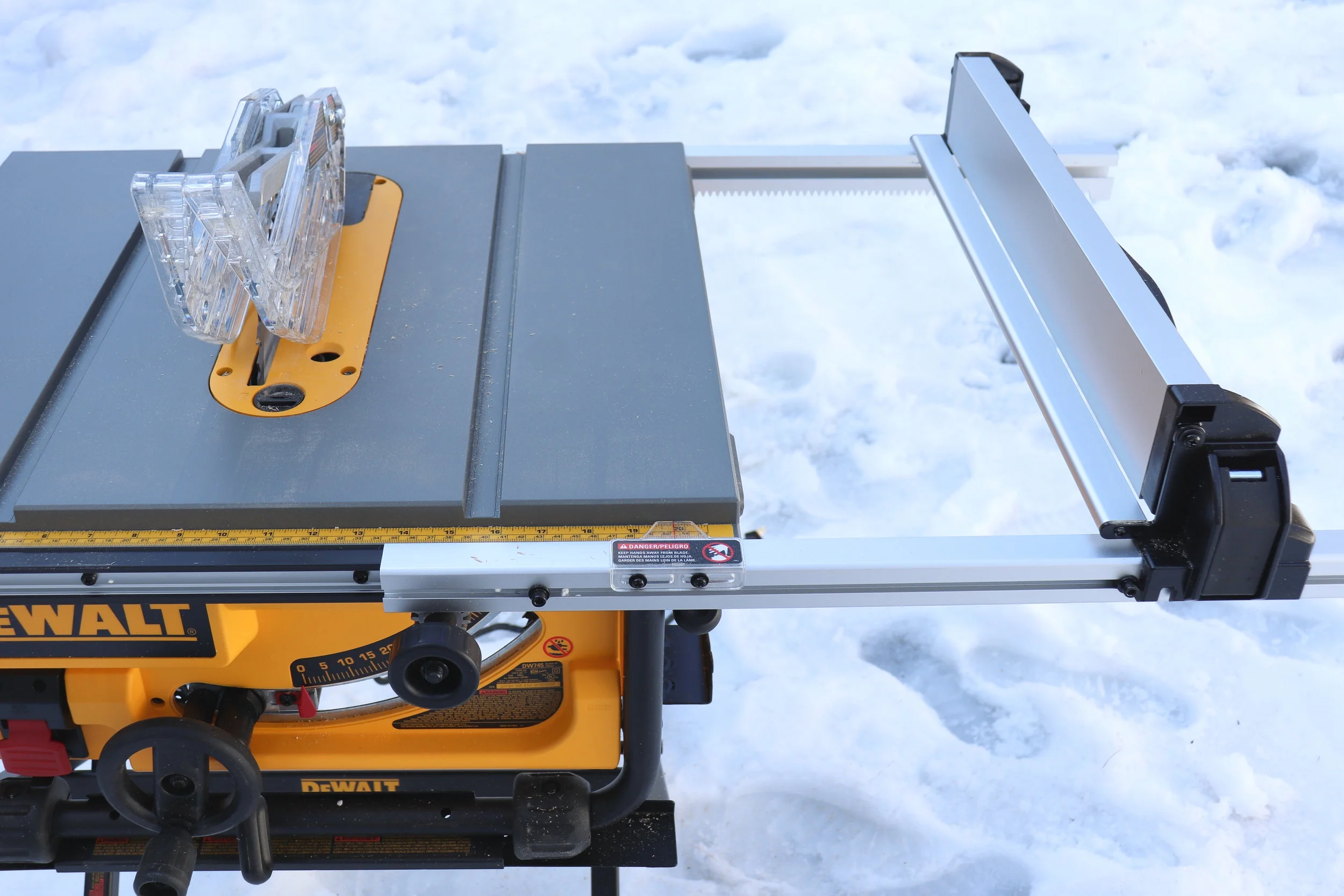
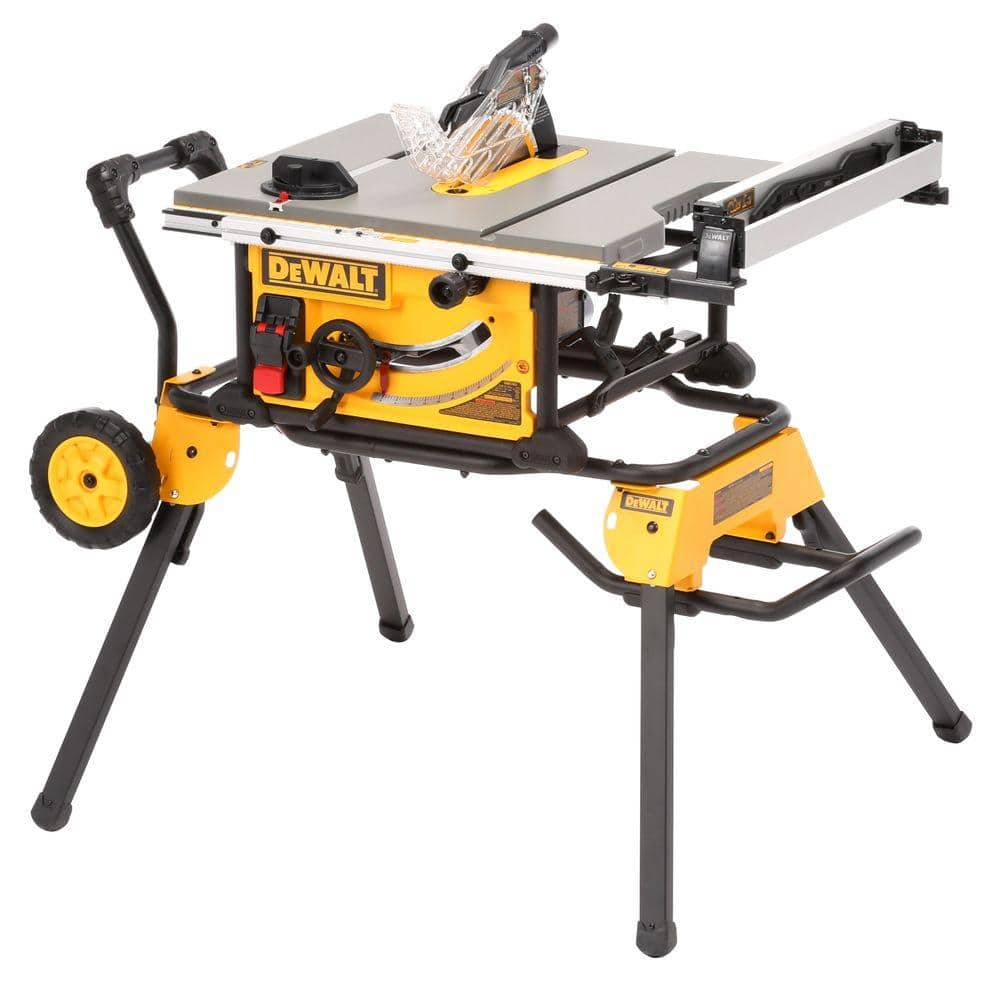
Before you start cutting, it’s important to know the key parts and what makes Dewalt table saws stand out. Dewalt offers several models, but their table saws share some common features that are important for every user.
Key Parts of a Dewalt Table Saw:
- Rip fence: Guides your material for straight cuts.
- Blade guard: Protects your hands from the blade.
- Miter gauge: Helps with angled cuts.
- Riving knife: Reduces kickback.
- On/off switch: Often has a safety cover.
- Blade height adjustment wheel: Raises or lowers the blade.
- Bevel adjustment: Tilts the blade for angled cuts.
- Dust port: Connects to shop vacs for cleaner work.
- Stand: Portable models have foldable stands for jobsite use.
Dewalt table saws are known for their rack and pinion fence system, which allows for easy and accurate adjustments. Most models also have a powerful 15-amp motor and a robust safety system.
Dewalt Table Saw Model Comparison
To choose the right saw or understand your model, here is a comparison of Dewalt’s most popular portable table saws:
| Model | Blade Size | Rip Capacity | Motor Power | Weight |
|---|---|---|---|---|
| DWE7485 | 8-1/4″ | 24.5″ | 15 Amp | 46 lbs |
| DW745 | 10″ | 20″ | 15 Amp | 45 lbs |
| DWE7491RS | 10″ | 32.5″ | 15 Amp | 90 lbs |
A bigger rip capacity means you can cut wider sheets, while lighter models are easier to transport.
Setting Up Your Dewalt Table Saw
Correct setup is the foundation for safe and accurate cuts. Many users miss key steps here, leading to frustration or poor results.
Unboxing And Assembly
- Read the manual: Dewalt manuals are clear and specific to each model. Always start here.
- Check parts: Make sure all parts are included—fence, miter gauge, blade, wrenches, push stick, and safety features.
- Blade installation: Most Dewalt saws ship with the blade not installed. Use the included wrench to fit the blade, ensuring the teeth face forward.
- Attach the rip fence and miter gauge: Slide these into their tracks.
- Install the blade guard and riving knife: Essential for safety. Never operate without them unless the cut demands removal (like dado cuts).
- Attach to stand (if included): Foldable stands are straightforward—follow the manual for secure locking.
Workspace Preparation
Set up your table saw on a level surface with plenty of room. The work area should be free of clutter, cords, and obstacles. Good lighting is critical. If using a shop vacuum or dust collector, connect it to the saw’s dust port.
Pro tip: Place the saw so you can feed long boards without hitting walls or other tools. Plan your infeed and outfeed space.
Electrical Safety
Most Dewalt saws use standard 120V outlets. Check that your outlet is grounded and avoid using lightweight extension cords. Heavy-duty 12 or 14 gauge cords under 25 feet are best to prevent voltage drop and motor damage.
Credit: www.3x3custom.com
Basic Operations: Making Your First Cuts
Once your Dewalt table saw is set up, you’re ready to start cutting. But safety comes first.
Safety Checklist
- Wear safety glasses and hearing protection
- Never wear gloves or loose clothing
- Keep hands at least 6 inches from the blade
- Use push sticks for narrow cuts
- Double-check that the blade guard is in place
- Stand to one side of the blade, not directly behind
Adjusting The Rip Fence
The rip fence is your guide for straight, accurate cuts. Dewalt’s rack and pinion system makes it easy:
- Unlock the fence lever.
- Slide the fence to your desired width, using the scale on the front rail.
- Lock it down firmly.
- Always check the fence is parallel to the blade—misalignment causes binding or kickback.
Non-obvious insight: Even a tiny misalignment can cause burning or dangerous kickback. Use a tape measure from the fence to the blade at both the front and back to confirm accuracy if you’re not sure.
Setting Blade Height
For most cuts, set the blade so the teeth are just above the material (about 1/8” higher). This gives a clean cut without exposing more blade than needed.
To adjust:
- Turn the blade height wheel until the top tooth is just above your workpiece.
- For bevel cuts, use the bevel adjustment and lock it at your angle.
Making Rip Cuts
A rip cut goes along the length of the wood. Here’s how:
- Mark your cut line.
- Set the fence to the correct width.
- Raise the blade to the right height.
- Turn on the saw.
- Hold the wood firmly against the fence and table.
- Push steadily through the blade, using a push stick for anything under 4 inches wide.
- Let the offcut fall; don’t reach over the blade.
Crosscuts With The Miter Gauge
Crosscuts go across the grain. Never use the fence for crosscuts (risk of binding).
- Insert the miter gauge in its slot.
- Adjust to 90° for straight cuts, or set an angle as needed.
- Hold the wood firmly against the miter gauge.
- Push through the blade, keeping hands clear.
Advanced Cutting Techniques
Once you’re comfortable with basic cuts, Dewalt table saws let you try more advanced work.
Bevel Cuts
The bevel adjustment allows the blade to tilt, typically up to 45°. Loosen the bevel lock, tilt the blade, and lock it in place. Always use a square to confirm the angle.
Example: For a 45° bevel, tilt the blade and use the fence as normal. Perfect for picture frames or molding.
Dado Cuts
A dado is a wide groove cut into wood. Dewalt saws like the DWE7491RS accept dado blade sets (up to 13/16” wide).
Steps:
- Remove the blade guard and riving knife (replace after).
- Install the dado stack per the manual.
- Use the dado throat plate for clearance.
- Set blade height and fence as usual.
Safety note: Never use a dado blade without the correct throat plate.
Rabbet Cuts
A rabbet is an edge cut, commonly for cabinet backs or frames.
- Set blade height to the rabbet depth.
- Use the fence to guide the board edge over the blade.
- Make two passes if needed—one for width, one for depth.
Cutting Sheet Goods
Cutting plywood or MDF can be tricky. Use support stands or a helper to manage large sheets. Start with the good side up (less splintering on the bottom).
Taper Cuts
Dewalt does not include a taper jig, but you can buy or make one. A taper jig guides the board at an angle for tapered legs or decorative edges.
Non-obvious insight: Always test on scrap first, and keep your hands well away from the blade when using jigs.

Credit: www.youtube.com
Getting The Most From Your Dewalt Table Saw
Using your saw efficiently can save time and improve results. Here’s how to take your skills further:
Accurate Repetitive Cuts
For multiple boards of the same size, set up a stop block on the fence or miter gauge. This ensures every piece is identical. Never use the fence as a stop for crosscuts—use a separate block clamped to the fence, keeping the workpiece free to move after the cut.
Handling Small Parts
Small pieces are dangerous to cut freehand. Use push blocks, featherboards, or sleds for better control and safety.
Dust Collection
Connect a shop vac or dust extractor to the dust port. Not only does this keep your workspace clean, it reduces airborne particles, protecting your lungs.
Blade Selection
Different blades suit different jobs. Dewalt saws come with a general purpose blade (24-40 teeth), good for rough cuts. For fine work, use an 80-tooth blade. For plywood or melamine, use a blade designed to reduce tear-out.
Table Saw Maintenance
Regular maintenance extends the life of your saw and keeps cuts precise.
- Clean the table surface with a dry cloth.
- Check the blade for pitch or resin buildup.
- Lubricate the gears as the manual recommends.
- Inspect the power cord for damage.
- Check the alignment of the fence and miter gauge.
- Ensure safety features are working.
Pro tip: Waxing the table surface (with paste wax) reduces friction and helps wood slide smoothly.
Troubleshooting Common Issues
Even a high-quality saw like Dewalt can develop problems. Here’s how to fix common issues:
Poor Cut Quality
If you see burn marks or rough edges:
- Check blade sharpness and type.
- Confirm the fence is parallel to the blade.
- Slow your feed rate.
Saw Won’t Start
- Check power supply and outlet.
- Inspect the on/off switch for damage.
- Reset the overload protector if tripped.
Kickback
Kickback happens when wood is thrown back at the user. Most often caused by:
- Fence not parallel to blade.
- Warped or twisted wood.
- Removing the riving knife or guard (never do this unless absolutely required).
- Feeding wood unevenly.
Safety insight: Stand to the side of the blade when cutting. This reduces injury risk if kickback occurs.
Inaccurate Fence Or Miter Gauge
If cuts are not square:
- Adjust the fence using the manual’s calibration procedure.
- Use a reliable square to check the miter gauge angle.
Blade Wobble
If you notice vibration or uneven cuts:
- Unplug the saw and check that the blade is tight.
- Replace bent or damaged blades.
Credit: www.homedepot.com
Safety Features And Best Practices
Dewalt table saws are packed with safety features. But user habits matter most.
Key Safety Features
- Riving knife: Helps prevent kickback by keeping wood from pinching the blade.
- Blade guard: Shields your hands from the blade.
- Anti-kickback pawls: Grab wood if it tries to fly back.
- Large stop switch: Easy to hit in an emergency.
Best Practices
- Always use safety gear: Glasses, hearing protection, and a dust mask.
- Never disable safety features unless the cut demands it (and know the risks).
- Keep the work area clean—debris causes slips and mistakes.
- Double-check blade and fence settings before each cut.
- Never reach over the blade for any reason.
- Unplug the saw before changing the blade or cleaning.
Non-obvious insight: Static electricity can build up on saws, especially in dry weather. Wipe down the saw with a damp (not wet) cloth to reduce static that attracts dust.
Essential Accessories For Your Dewalt Table Saw
While your saw works well out of the box, a few accessories can make it even better:
- Dado blade set: For grooves and joinery.
- Zero-clearance throat plate: Reduces tear-out on fine cuts.
- Featherboards: Hold wood tightly against the fence.
- Push blocks/sticks: Essential for narrow pieces.
- Roller stands: Support long boards or sheet goods.
- Mobile base or wheel kit: If you need to move the saw often.
Table Saw Safety Data
To understand why safety is so important, consider this data:
| Statistic | Value |
|---|---|
| Annual table saw injuries (US) | ~30,000 |
| Fingers/hand injuries | ~90% |
| Most common cause | Kickback |
| Most affected users | DIYers, not pros |
Staying alert and respecting your Dewalt table saw’s power is critical.
Maintenance Schedule
A regular maintenance schedule will keep your saw running smoothly for years.
| Task | Frequency |
|---|---|
| Clean table surface | After every use |
| Check blade sharpness | Monthly |
| Lubricate gears | Every 6 months |
| Inspect fence alignment | Monthly |
| Test safety features | Every use |
Upgrading And Customizing Your Dewalt Table Saw
As you grow more confident, you may want to add upgrades:
- Aftermarket fences for even more precision.
- Outfeed tables for handling long boards.
- Router table inserts for more versatility.
- Custom throat plates for special blades.
- Digital angle gauges for precise bevels.
Most Dewalt saws are compatible with standard accessories, but always check fit before buying.
Non-obvious insight: If you regularly cut sheet goods, consider building a side extension table. This makes handling large panels much safer and more accurate.
Common Mistakes And How To Avoid Them
Avoiding mistakes saves wood, time, and sometimes your fingers. Here are the most frequent errors with Dewalt table saws:
- Skipping the manual: Even if you’ve used other saws, Dewalt’s features (like the rack and pinion fence) are unique.
- Not checking fence alignment: This tiny step prevents rough cuts and kickback.
- Removing safety features unnecessarily: Only remove the guard/riving knife for non-through cuts, and reinstall immediately after.
- Feeding wood too fast or slow: Let the saw do the work; don’t force the material.
- Using the wrong blade: Match the blade to your project for best results.
- Not supporting long boards: This can cause tipping or crooked cuts.
- Cutting warped or twisted wood: Always inspect lumber before cutting.
- Standing directly behind the blade: Stand to one side to avoid the path of kickback.
- Neglecting dust collection: Dust build-up can affect tool life and health.
- Improper work area setup: Not having enough space can cause mistakes and accidents.
Experience-based tip: Always do a dry run—move the wood through the cutting path with the saw off to spot any obstacles or awkward movements before turning on the blade.
When To Call For Professional Help
If you notice loud noises, vibration, electrical smells, or anything unusual, stop using the saw and consult Dewalt’s customer service or a local repair shop. Never try to repair electrical parts yourself unless you are qualified. Warranty repairs must be done by authorized centers to avoid voiding coverage.
You can find official support and manuals at the Dewalt Support page.
Frequently Asked Questions
How Do I Change The Blade On My Dewalt Table Saw?
Unplug the saw first. Raise the blade fully, remove the throat plate, and use the included wrench to loosen the arbor nut (turning it toward the front of the saw). Remove the old blade, install the new one with teeth facing forward, and tighten the nut.
Replace the throat plate and plug the saw back in.
Can I Use A Dado Blade On All Dewalt Table Saws?
Not all Dewalt table saws accept dado blades. Models like the DWE7491RS are designed for dado stacks, but smaller models (like the DWE7485) do not support them due to arbor length or throat plate size. Always check your manual before trying to use a dado blade.
How Do I Keep The Fence Parallel To The Blade?
Dewalt’s rack and pinion system usually keeps the fence parallel automatically. If you notice misalignment, recalibrate following the manual’s instructions, or measure from the blade to the fence at the front and back with a tape measure. Adjust as needed.
What Type Of Blade Is Best For Plywood?
For plywood, use a fine-tooth or plywood-specific blade (at least 60–80 teeth). This reduces splintering and gives a cleaner edge. Consider adding a zero-clearance throat plate for even better results.
How Do I Reduce Dust When Using My Dewalt Table Saw?
Connect a shop vacuum or dust extractor to the saw’s dust port. Regularly clean under the saw and around the blade with a brush or vacuum. Wearing a dust mask is also recommended, especially indoors.
Using a Dewalt table saw opens up a world of woodworking possibilities. Take the time to set it up correctly, use it safely, and maintain it well. With care, your Dewalt saw will deliver years of accurate, reliable service—making every project smoother and more enjoyable.